Wednesday, 15 December 2021

E-mail : Types, Uses, and Web Mail


E-mail:

Electronic mail (email or e-mail) is a method of exchanging messages ("mail") between people using electronic devices. Email entered limited use in the 1960s, but users could only send to users of the same computer. Some systems also supported a form of instant messaging, where sender and receiver needed to be online simultaneously. Ray Tomlinson is credited as the inventor of networked email; in 1971, he developed the first system able to send mail between users on different hosts across the ARPANET, using the @ sign to link the user name with a destination server. By the mid-1970s, this was the form recognized as email.

Email operates across computer networks, primarily the Internet. Today's email systems are based on a store-and-forward model. Email servers accept, forward, deliver, and store messages. Neither the users nor their computers are required to be online simultaneously; they need to connect, typically to a mail server or a webmail interface to send or receive messages or download it.

Originally an ASCII text-only communications medium, Internet email was extended by Multipurpose Internet Mail Extensions (MIME) to carry text in other character sets and multimedia content attachments. 


The basic Internet message format used for email is defined by RFC 5322, with encoding of non-ASCII data and multimedia content attachments defined in RFC 2045 through RFC 2049, collectively called Multipurpose Internet Mail Extensions or MIME. The extensions in International email apply only to email.

Internet email messages consist of two sections, 'header' and 'body'. These are known as 'content'. The header is structured into fields such as From, To, CC, Subject, Date, and other information about the email. In the process of transporting email messages between systems, SMTP communicates delivery parameters and information using message header fields. The body contains the message, as unstructured text, sometimes containing a signature block at the end. The header is separated from the body by a blank line.

Common header fields for email include:

·         To: The email address(es), and optionally name(s) of the message's recipient(s). Indicates primary recipients (multiple allowed).

·          Subject: A brief summary of the topic of the message. Certain abbreviations are commonly used in the subject, including "RE:" and "FW:".

·         Cc: Carbon copy; Many email clients mark email in one's inbox differently depending on whether they are in the To: or Cc: list.

·         Bcc: Blind carbon copy; addresses are usually only specified during SMTP delivery, and not usually listed in the message header.

·         Content-Type: Information about how the message is to be displayed, usually a MIME type.

·         Precedence: commonly with values "bulk", "junk", or "list"; used to indicate automated "vacation" or "out of office" responses should not be returned for this mail, e.g. to prevent vacation notices from sent to all other subscribers of a mailing list. Sendmail uses this field to affect prioritization of queued email, with "Precedence: special-delivery" messages delivered sooner. With modern high-bandwidth networks, delivery priority is less of an issue than it was. Microsoft Exchange respects a fine-grained automatic response suppression mechanism, the X-Auto-Response-Suppress field.[43]

·         Message-ID: Also an automatic-generated field to prevent multiple deliveries and for reference in In-Reply-To: (see below).

·         In-Reply-To: Message-ID of the message this is a reply to. Used to link related messages together. This field only applies to reply messages.

·         References: Message-ID of the message this is a reply to, and the message-id of the message the previous reply was a reply to, etc.

·         Reply-To: Address should be used to reply to the message.

·         Sender: Address of the sender acting on behalf of the author listed in the From: field (secretary, list manager, etc.).

·         Archived-At: A direct link to the archived form of an individual email message.


Types:

Web-based email

Many email providers have a web-based email client (e.g. AOL Mail, Gmail, Outlook.com and Yahoo! Mail). This allows users to log into the email account by using any compatible web browser to send and receive their email. Mail is typically not downloaded to the web client, so can't be read without a current Internet connection.

POP3 email servers

The Post Office Protocol 3 (POP3) is a mail access protocol used by a client application to read messages from the mail server. Received messages are often deleted from the server. POP supports simple download-and-delete requirements for access to remote mailboxes (termed maildrop in the POP RFC's). POP3 allows you to download email messages on your local computer and read them even when you are offline.

IMAP email servers

The Internet Message Access Protocol (IMAP) provides features to manage a mailbox from multiple devices. IMAP shows the headers of messages, the sender and the subject and the device needs to request to download specific messages. Usually, the mail is left in folders in the mail server.

MAPI email servers

Messaging Application Programming Interface (MAPI) is used by Microsoft Outlook to communicate to Microsoft Exchange Server - and to a range of other email server products such as Axigen Mail Server, Kerio Connect, Scalix, Zimbra, HP OpenMail, IBM Lotus Notes, Zarafa, and Bynari where vendors have added MAPI support to allow their products to be accessed directly via Outlook.

Uses:

Business and organizational use

Email has been widely accepted by businesses, governments and non-governmental organizations in the developed world, and it is one of the key parts of an 'e-revolution' in workplace communication. It has some key benefits to business and other organizations, including facilitating logistics, helping with synchronization, reducing cost, Increasing speed, possibility of auto-processing and improved distribution, Email marketing.

Personal use

Many users access their personal emails from friends and family members using a personal computer in their house or apartment. Mobile "apps" for email increase accessibility to the medium for users who are out of their homes. Individuals often check emails on smartphones for both personal and work-related messages.

Email attachment:

Email messages may have one or more attachments, which are additional files that are appended to the email. Typical attachments include Microsoft Word documents, PDF documents, and scanned images of paper documents. In principle, there is no technical restriction on the size or number of attachments. However, in practice, email clients, servers, and Internet service providers implement various limitations on the size of files, or complete email - typically to 25MB or less. Furthermore, due to technical reasons, attachment sizes as seen by these transport systems can differ from what the user sees, which can be confusing to senders when trying to assess whether they can safely send a file by email. Where larger files need to be shared, various file hosting services are available and commonly used.


Web mail:


Webmail (or web-based email) is an email service that can be accessed using a standard web browser. It contrasts with email service accessible through specialised email client software.

Examples of webmail providers are AOL Mail, Gmail, GMX Mail, Mailfence, Outlook.com/Hotmail.com, Yahoo Mail and IceWarp Mail Server.

Additionally, many internet service providers provide webmail as part of their internet service package. Similarly, some web hosting providers also provide webmail as a part of their hosting package.

Webmail access is made possible through webmail software, such as Roundcube or SquirrelMail, installed and running on the email server.

As with any web application, webmail's main advantage over the use of a desktop email client is the ability to send and receive email anywhere from a web browser. Its main disadvantage is the need to be connected to the Internet while using it.


The first Web Mail implementation was developed at CERN in 1993 by Phillip Hallam-Baker as a test of the HTTP protocol stack, but was not developed further. In the next two years, however, several people produced working webmail applications.

Most Commonly used WWW Development Languages


WWW Development Languages:

Most Commonly Used Languages

There is a variety of coding languages developers choose from, and most use the language they are most comfortable with. Their preference is formed over time based on their experience using different languages.

Here are the most common languages and how they are used:

1. HTML

HTML makes up the layout and structure for your website. This language is dynamic and allows you to create a beautiful website using less code. HTML is used to create a starting point for the website and is what most of your static pages start from. A better way to understand this language is to consider it as the skeleton that is holding your website together.

2. CSS

CSS is the language developers can use to style a website. The style sheet language describes how your website is presented and its layout. CSS is used hand in hand with HTML to add colors, backgrounds, layouts, font sizes, and more. This language is a core technology web developers use to design and build websites.

3. Java

Java is the most popular web programming language. It is used to develop website content, games, apps, and software. Java is used in the production of most Android apps. Studies have shown over 15 billion devices are using Java in some form or other. Java language is portable and can be run on multiple software platforms.

4. JavaScript

JavaScript is used in many aspects of web development. Web developers use this language to add interactive elements to their websites. User engagement is important to your business, and your web developer should be incorporating JavaScript elements in your design.

5. Python

Python is one of the easiest languages to use and work with. Python can create a framework for basically any website need. This language uses simple and straightforward syntax, making it easy for web developers to work with and explain to their users. Some familiar sites that are using this language are Pinterest and Instagram.

6. SQL

SQL is a database query language that is used when your website is computing large amounts of data. Using SQL allows you to gather data from different databases and use it to cater your website to your target audience. This language is not used alone; instead, it is paired with others to get the most out of your customer database and website development.

7. PHP

PHP is often used on data-heavy websites or for app development. This is an open-source language that can be easily modified to meet the needs of your business or website. Large websites like WordPress and Facebook use PHP to manage and process their data.

8. .NET

.NET (pronounced dot net) is a framework that provides programming guidelines that can be used to develop a wide range of applications from the web to mobile to Windows-based applications. The .NET framework can work with several web programming languages such as C#, VB.NET, C++, and F#. At Grand Circus, we use C# as well as MVC. .NET has a huge collection of predefined class libraries (pre-written code) that has support for simple and complex data structures.

9. Angular

Angular is a TypeScript-based open-source front-end application platform led by the Angular Team at Google and by a community of individuals and corporations. Angular is a complete rewrite from the same team that built AngularJS. Angular is a platform that makes it easy to build applications with the web. Angular combines declarative templates, dependency injection, end to end tooling, and integrated best practices to solve development challenges. Angular empowers developers to build applications that live on the web, mobile, or the desktop.

Why Do Some Languages Work Better Than Others?

No one language is inherently better than another, they just perform better with different tasks. There are some key factors that web developers consider when they are deciding what language or coding method to use while working on a project. Here are some of those factors:

·         Expressiveness: The expressiveness relates to how easy a language is to understand, use, and write. The productivity of a language says a lot about how expressive your website will be. The easier a language is to write, the more time can be spent on adding design elements to the site. The expressiveness relates to how easy it is to add to the existing code. A developer will use a language where he or she does not have to spend a lot of time thinking about how to expand upon the code to grow or update the website.

·         Reliability: The reliability of the language and the code is important. The functionality of your website relies on how reliable the language is. The code is also in place to protect your website and customers. Reliable code will be easy to test and maintain. When a developer is reviewing the code, he or she should be able to scan it and get a sense for how reliable the website will be.

·         Performance: This is an important factor for developers to consider when they are working on a business website. They must take into consideration the amount of traffic your site will receive and what types of activities users will be doing while they visit your website. They will look for easy optimization to different servers and browsers and will want to make sure the code will operate consistently throughout a visitor’s time spent on the website.


What is a Search Engine?


Search Engine:

search engine is a software system that is designed to carry out web searches. They search the World Wide Web in a systematic way for particular information specified in a textual web search query. The search results are generally presented in a line of results, often referred to as search engine results pages (SERPs) The information may be a mix of links to web pages, images, videos, infographics, articles, research papers, and other types of files. Some search engines also mine data available in databases or open directories. Unlike web directories, which are maintained only by human editors, search engines also maintain real-time information by running an algorithm on a web crawler. Internet content that is not capable of being searched by a web search engine is generally described as the deep web.

A search engine maintains the following processes in near real time:

1.   Web crawling

2.   Indexing

3.   Searching

Web search engines get their information by web crawling from site to site. The "spider" checks for the standard filename robots.txt, addressed to it. The robots.txt file contains directives for search spiders, telling it which pages to crawl and which pages not to crawl. After checking for robots.txt and either finding it or not, the spider sends certain information back to be indexed depending on many factors, such as the titles, page content, JavaScript, Cascading Style Sheets (CSS), headings, or its metadata in HTML meta tags. After a certain number of pages crawled, amount of data indexed, or time spent on the website, the spider stops crawling and moves on. "[N]o web crawler may actually crawl the entire reachable web. Due to infinite websites, spider traps, spam, and other exigencies of the real web, crawlers instead apply a crawl policy to determine when the crawling of a site should be deemed sufficient. Some websites are crawled exhaustively, while others are crawled only partially".

Indexing means associating words and other definable tokens found on web pages to their domain names and HTML-based fields. The associations are made in a public database, made available for web search queries. A query from a user can be a single word, multiple words or a sentence. The index helps find information relating to the query as quickly as possible

Between visits by the spider, the cached version of page (some or all the content needed to render it) stored in the search engine working memory is quickly sent to an inquirer. The cached page holds the appearance of the version whose words were previously indexed, so a cached version of a page can be useful to the web site when the actual page has been lost, but this problem is also considered a mild form of linkrot.

Typically when a user enters a query into a search engine it is a few keywords. The index already has the names of the sites containing the keywords, and these are instantly obtained from the index. The real processing load is in generating the web pages that are the search results list: Every page in the entire list must be weighted according to information in the indexes.

The usefulness of a search engine depends on the relevance of the result set it gives back. While there may be millions of web pages that include a particular word or phrase, some pages may be more relevant, popular, or authoritative than others. Most search engines employ methods to rank the results to provide the "best" results first. How a search engine decides which pages are the best matches, and what order the results should be shown in, varies widely from one engine to another. The methods also change over time as Internet usage changes and new techniques evolve. There are two main types of search engine that have evolved: one is a system of predefined and hierarchically ordered keywords that humans have programmed extensively. The other is a system that generates an "inverted index" by analyzing texts it locates. This first form relies much more heavily on the computer itself to do the bulk of the work.

Most Web search engines are commercial ventures supported by advertising revenue and thus some of them allow advertisers to have their listings ranked higher in search results for a fee. Search engines that do not accept money for their search results make money by running search related ads alongside the regular search engine results. The search engines make money every time someone clicks on one of these ads.

Local search:

Local search is the process that optimizes efforts of local businesses. They focus on change to make sure all searches are consistent. It's important because many people determine where they plan to go and what to buy based on their searches.

What is a Uniform Resource Locator (URL) ?


Uniform Resource Locator (URL):


Uniform Resource Locator (URL), also termed as a web address, is a reference to a web resource that specifies its location on a computer network and a mechanism for retrieving it. A URL is a specific type of Uniform Resource Identifier (URI), although many people use the two terms interchangeably. URLs occur most commonly to reference web pages (http), but are also used for file transfer (ftp), email (mailto), database access (JDBC), and many other applications.

Most web browsers display the URL of a web page above the page in an address bar. A typical URL could have the form http://www.example.com/index.html, which indicates a protocol (http), a hostname (www.example.com), and a file name (index.html).

Uniform Resource Locators were defined in RFC 1738 in 1994 by Tim Berners-Lee, the inventor of the World Wide Web, and the URI working group of the Internet Engineering Task Force (IETF), as an outcome of collaboration started at the IETF Living Documents birds of a feather session in 1992.

Every HTTP URL conforms to the syntax of a generic URI. The URI generic syntax consists of a hierarchical sequence of five components:

URI = scheme:[//authority]path[?query][#fragment]

where the authority component divides into three subcomponents:

authority = [userinfo@]host[:port]

This is represented in a syntax diagram as:

URL Syntax Diagram

The URI comprises:

·         A non-empty scheme component followed by a colon (:), consisting of a sequence of characters beginning with a letter and followed by any combination of letters, digits, plus (+), period (.), or hyphen (-). Although schemes are case-insensitive, the canonical form is lowercase and documents that specify schemes must do so with lowercase letters. Examples of popular schemes include httphttpsftpmailtofiledata, and irc. URI schemes should be registered with the Internet Assigned Numbers Authority (IANA), although non-registered schemes are used in practice.

·         An optional authority component preceded by two slashes (//), comprising:

o     An optional userinfo subcomponent that may consist of a user name and an optional password preceded by a colon (:), followed by an at symbol (@).

o     host subcomponent, consisting of either a registered name or an IP address. IPv4 addresses must be in dot-decimal notation, and IPv6 addresses must be enclosed in brackets ([]).

o    An optional port subcomponent preceded by a colon (:).

·         path component, consisting of a sequence of path segments separated by a slash (/). A path is always defined for a URI, though the defined path may be empty (zero length). A segment may also be empty, resulting in two consecutive slashes (//) in the path component. A path component may resemble or map exactly to a file system path, but does not always imply a relation to one.

·         An optional query component preceded by a question mark (?), containing a query string of non-hierarchical data.

·         An optional fragment component preceded by a hash (#). The fragment contains a fragment identifier providing direction to a secondary resource, such as a section heading in an article identified by the remainder of the URI. A web browser will usually dereference a URL by performing an HTTP request to the specified host, by default on port number 80. URLs using the https scheme require that requests and responses be made over a secure connection to the website.

Web Browser and its Features


Web Browser:

web browser (commonly referred to as a browser) is application software for accessing the World Wide Web. When a user requests a web page from a particular website, the web browser retrieves the necessary content from a web server and then displays the page on the user's device.

A web browser is not the same thing as a search engine, though the two are often confused. A search engine is a website that provides links to other websites. However, to connect to a website's server and display its web pages, a user must have a web browser installed.

Web browsers are used on a range of devices, including desktops, laptops, tablets, and smart phones. The first web browser, called World Wide Web, was created in 1990 by Sir Tim Berners-Lee. He then recruited Nicola Pellow to write the Line Mode Browser, which displayed web pages on dumb terminals; it was released in 1991.

1993 was a landmark year with the release of Mosaic, credited as "the world's first popular browser". Its innovative graphical interface made the World Wide Web system easy to use and thus more accessible to the average person. Marc Andreessen, the leader of the Mosaic team, soon started his own company, Netscape, which released the Mosaic-influenced Netscape Navigator in 1994. Navigator quickly became the most popular browser.

Microsoft debuted Internet Explorer in 1995, leading to a browser war with Netscape.  In 1998, Netscape launched what would become the Mozilla Foundation to create a new browser using the open source software model. This work evolved into the Firefox browser, first released by Mozilla in 2004. Apple released its Safari browser in 2003. It remains the dominant browser on Apple devices, though it did not become popular elsewhere. Google debuted its Chrome browser in 2008, which steadily took market share from Internet Explorer and became the most popular browser in 2012. Chrome has remained dominant ever since. Microsoft released its Edge browser in 2015 as part of the Windows 10 release. (Internet Explorer is still used on older versions of Windows.)

In terms of technology, browsers have greatly expanded their HTML, CSS, JavaScript, and multimedia capabilities since the 1990s. One reason has been to enable more sophisticated websites, such as web applications. Another factor is the significant increase of broadband connectivity, which enables people to access data-intensive web content, such as YouTube streaming, that was not possible during the era of dial-up modems.


The purpose of a web browser is to fetch content from the Web and display it on a user's device. Once a web page has been retrieved, the browser's rendering engine displays it on the user's device. This includes image and video formats supported by the browser.

Web pages usually contain hyperlinks to other pages and resources. Each link contains a URL, and when it is clicked or tapped, the browser navigates to the new resource. Thus the process of bringing content to the user begins again.

Most browsers use an internal cache of web page resources to improve loading times for subsequent visits to the same page. The cache can store many items, such as large images, so they do not need to be downloaded from the server again. Cached items are usually only stored for as long as the web server stipulates in its HTTP response messages.

Web browsers can typically be configured with a built-in menu. Depending on the browser, the menu may be named SettingsOptions, or Preferences. The menu has different types of settings. For example, users can change their home page and default search engine. They also can change default web page colors and fonts. Various network connectivity and privacy settings are also usually available.

Privacy:

During the course of browsing, cookies received from various websites are stored by the browser. Some of them contain login credentials or site preferences. Browsers also usually provide menu items for deleting browsing history, cache entries, and other potentially sensitive data.

An alternative approach is the private browsing mode, in which the aforementioned items are not stored by the browser. But this is a temporary option, only activated when using this special mode.

Features:

The most popular browsers have a number of features in common. They automatically log browsing history or can be used in a non-logging private mode. They also allow users to set bookmarks and customize the browser with extensions. Some provide a sync service.

Most browsers have these user interface (UI) features:

·         Allow the user to open multiple pages at the same time, either in different browser windows or in different tabs of the same window.

·         Back and forward buttons to go back to the previous page visited or forward to the next one.

·         refresh or reload and a stop button to reload and cancel loading the current page. (In most browsers, the stop button is merged with the reload button.)

·         home button to return to the user's home page.

·         An address bar to input the URL of a page and display it.

·         A search bar to input terms into a search engine. (In some browsers, the search bar is merged with the address bar.)

However, the limitations of touch screens require mobile browsers to have a simpler UI than desktop versions. The difference is significant for users accustomed to keyboard shortcuts.


Security:

Web browsers are popular targets for hackers, who exploit security holes to steal information, destroy files, and other malicious activities. Browser vendors regularly patch these security holes, so users are strongly encouraged to keep their browser software updated. Other protection measures are antivirus software and avoiding known-malicious websites.

World Wide Web (WWW): Function, Web Page, and Website


World Wide Web (WWW):

The World Wide Web (WWW), commonly known as the Web, is an information system where documents and other web resources are identified by Uniform Resource Locators (URLs, such as https://example.com/), which may be interlinked by hyperlinks, and are accessible over the Internet.

The resources of the Web are transferred via the Hypertext Transfer Protocol (HTTP), may be accessed by users by a software application called a web browser, and are published by a software application called a web server. The World Wide Web is not synonymous with the Internet, which pre-dated the Web in some form by over two decades and upon which technologies the Web is built.

English scientist Tim Berners-Lee invented the World Wide Web in 1989. He wrote the first web browser in 1990 while employed at CERN near Geneva, Switzerland. The World Wide Web has been central to the development of the Information Age, and is the primary tool billions of people use to interact on the Internet.

Web resources may be any type of downloaded media, but web pages are hypertext documents formatted in Hypertext Markup Language (HTML). Special HTML syntax displays embedded hyperlinks with URLs which permits users to navigate to other web resources. In addition to text, web pages may contain references to images, video, audio, and software components which are either displayed or internally executed in the user's web browser to render pages or streams of multimedia content.

Multiple web resources with a common theme and usually a common domain name make up a website. Websites are stored in computers that are running a web server, which is a program that responds to requests made over the Internet from web browsers running on a user's computer. Website content can be provided by a publisher, or interactively from user-generated content.

The World Wide Web enabled the spread of information over the Internet through an easy-to-use and flexible format. It thus played an important role in popularising use of the Internet. Although the two terms are sometimes conflated in popular use, World Wide Web is not synonymous with Internet. The Web is an information space containing hyperlinked documents and other resources, identified by their URIs. It is implemented as both client and server software using Internet protocols such as TCP/IP and HTTP.

Function:

The terms Internet and World Wide Web are often used without much distinction. However, the two terms do not mean the same thing. The Internet is a global system of interconnected computer networks. In contrast, the World Wide Web is a global collection of documents and other resources, linked by hyperlinks and URIs. Web resources are accessed using HTTP or HTTPS, which are application-level Internet protocols that use the Internet's transport protocols.

Viewing a web page on the World Wide Web normally begins either by typing the URL of the page into a web browser or by following a hyperlink to that page or resource. The web browser then initiates a series of background communication messages to fetch and display the requested page. In the 1990s, using a browser to view web pages—and to move from one web page to another through hyperlinks—came to be known as 'browsing,' 'web surfing' (after channel surfing), or 'navigating the Web'.


WWW prefix:

Many hostnames used for the World Wide Web begin with www because of the long-standing practice of naming Internet hosts according to the services they provide. The hostname of a web server is often www, in the same way that it may be ftp for an FTP server, and news or nntp for a Usenet news server. These host names appear as Domain Name System (DNS) or subdomain names, as in www.example.com.

When a user submits an incomplete domain name to a web browser in its address bar input field, some web browsers automatically try adding the prefix "www" to the beginning of it and possibly ".com", ".org" and ".net" at the end, depending on what might be missing. For example, entering 'microsoft' may be transformed to http://www.microsoft.com/ and 'openoffice' to http://www.openoffice.org. This feature started appearing in early versions of Firefox, when it still had the working title 'Firebird' in early 2003, from an earlier practice in browsers such as Lynx.

Scheme specifiers:

The scheme specifiers http:// and https:// at the start of a web URI refer to Hypertext Transfer Protocol or HTTP Secure, respectively. They specify the communication protocol to use for the request and response. The HTTP protocol is fundamental to the operation of the World Wide Web, and the added encryption layer in HTTPS is essential when browsers send or retrieve confidential data, such as passwords or banking information.

Web page:

web page (also written as webpage) is a document that is suitable for the World Wide Web and web browsers. A web browser displays a web page on a monitor or mobile device.

The term web page usually refers to what is visible, but may also refer to the contents of the computer file itself, which is usually a text file containing hypertext written in HTML or a comparable markup language. Typical web pages provide hypertext for browsing to other web pages via hyperlinks, often referred to as links. Web browsers will frequently have to access multiple web resource elements, such as reading style sheets, scripts, and images, while presenting each web page.

On a network, a web browser can retrieve a web page from a remote web server. The web server may restrict access to a private network such as a corporate intranet. The web browser uses the Hypertext Transfer Protocol (HTTP) to make such requests to the web server.

static web page is delivered exactly as stored, as web content in the web server's file system. In contrast, a dynamic web page is generated by a web application, usually driven by server-side software. Dynamic web pages are used when each user may require completely different information, for example, bank websites, web email etc.

Static page:

Main article: Static web page

static web page (sometimes called a flat page/stationary page) is a web page that is delivered to the user exactly as stored, in contrast to dynamic web pages which are generated by a web application.

Dynamic pages:

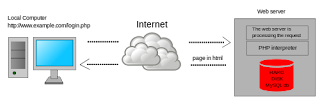
Dynamic web page working

server-side dynamic web page is a web page whose construction is controlled by an application server processing server-side scripts. In server-side scripting, parameters determine how the assembly of every new web page proceeds, including the setting up of more client-side processing.

client-side dynamic web page processes the web page using JavaScript running in the browser. JavaScript programs can interact with the document via Document Object Model, or DOM, to query page state and alter it. The same client-side techniques can then dynamically update or change the DOM in the same way.

A dynamic web page is then reloaded by the user or by a computer program to change some variable content. The updating information could come from the server, or from changes made to that page's DOM.

Dynamic HTML, or DHTML, is the umbrella term for technologies and methods used to create web pages that are not static web pages, though it has fallen out of common use since the popularization of AJAX, a term which is now itself rarely used. Client-side-scripting, server-side scripting, or a combination of these make for the dynamic web experience in a browser.

JavaScript is a scripting language that was initially developed in 1995 by Brendan Eich of Netscape, for use within web pages. To make web pages more interactive, some web applications also use JavaScript techniques such as Ajax (asynchronous JavaScript and XML). 

Website:

website is a collection of related web resources including web pages, multimedia content, typically identified with a common domain name, and published on at least one web server. A few notable examples of websites are wikipedia.org, google.com, and amazon.com.

A website may be accessible via a public Internet Protocol (IP) network, such as the Internet, or a private local area network (LAN), by referencing a uniform resource locator (URL) that identifies the site.

Websites can have many functions and can be used in various fashions; a website can be a personal website, a corporate website for a company, a government website, an organization website, etc. Websites are typically dedicated to a particular topic or purpose, ranging from entertainment and social networking to providing news and education. All publicly accessible websites collectively constitute the World Wide Web, while private websites, such as a company's website for its employees, are typically a part of an intranet.

Web pages, which are the building blocks of websites, are documents, typically composed in plain text interspersed with formatting instructions of Hypertext Markup Language (HTML, XHTML). They may incorporate elements from other websites with suitable markup anchors. Web pages are accessed and transported with the Hypertext Transfer Protocol (HTTP), which may optionally employ encryption (HTTP Secure, HTTPS) to provide security and privacy for the user. The user's application, often a web browser, renders the page content according to its HTML markup instructions onto a display terminal.

Hyperlinking between web pages conveys to the reader the site structure and guides the navigation of the site, which often starts with a home page containing a directory of the site web content. Some websites require user registration or subscription to access content. Examples of subscription websites include many business sites, news websites, academic journal websites, gaming websites, file-sharing websites, message boards, web-based email, social networking websites, websites providing real-time stock market data, as well as sites providing various other services. End users can access websites on a range of devices, including desktop and laptop computers, tablet computers, smart phones and smart TVs.


TCP/IP Reference Model


TCP/IP Reference Model:

TCP/IP Reference Model is a four-layered suite of communication protocols. It was developed by the DoD (Department of Defence) in the 1960s. It is named after the two main protocols that are used in the model, namely, TCP and IP. TCP stands for Transmission Control Protocol and IP stands for Internet Protocol.

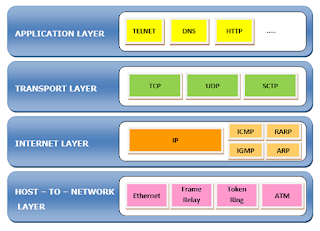
The four layers in the TCP/IP protocol suite are −

  • Host-to- Network Layer −It is the lowest layer that is concerned with the physical transmission of data. TCP/IP does not specifically define any protocol here but supports all the standard protocols.
  • Internet Layer −It defines the protocols for logical transmission of data over the network. The main protocol in this layer is Internet Protocol (IP) and it is supported by the protocols Internet Control Message Protocol (ICMP), Internet Group Management Protocol (IGMP), Reverse Address Resolution Protocol (RARP), and Address Resolution Protocol (ARP).
  • Transport Layer − It is responsible for error-free end-to-end delivery of data. The protocols defined here are Transmission Control Protocol (TCP) and User Datagram Protocol (UDP).
  • Application Layer − This is the topmost layer and defines the interface of host programs with the transport layer services. This layer includes all high-level protocols like Telnet, DNS, HTTP, FTP, SMTP, etc.

The following diagram shows the layers and the protocols in each of the layers –


TCP/IP Model