Tuesday, 18 August 2020

Data models in DBMS and differences between Relational, Network and Hierarchical models

 Various Data Models in DBMS:


 Data Model:

A data model is a collection of conceptual tools for describing data - its relationships, semantics and consistency constraints. Data models can be distinguished from one another on the basis of the relationship among data, that is defined and the way the data is conceptually defined.

A primary objective that a data model serves is to evolve a high level data model. It should assist the designer to incorporate a major portion of semantics of database in the schema.

In DBMS, the data models are broadly classified as:

1.    Object based data models

2.    Record based data models and;

3.    Physical data models


1.    Object Based Data Models:

These models are used in describing data at a logical and view level. They have properties like they provide flexible structure in the capabilities and allow us to specify data constraints explicitly. This model highlights that everything is object having set of attributes.


Examples of data models that fall in this category are:

a)    Entity relationship model

b)    Object oriented model


2.    Record Based Data Models:

The record based data models are used to describe data at a logical and view level. However, they revolve around the records of database and specify the overall structure of database with the help of value of records. This is a key distinguishing factor between the record based and object based model.


These models have got their name record based models because the database is structured in fixed format records of several types. Each record type defines a fixed number of fields or attributes and each field is usually of a fixed length. This results in simple physical level implementations of the database.

Examples of data models that fall in this category are:

a)    Relational model

b)    Network model

c)    Hierarchical model


3.    Physical Data Models:


This model is used to describe data at the lowest level. It actually describes the behaviour of data at disk level. Furthermore, it also describes the way data and data relationships that are maintained while storing them on the disk. As such this leads to the way a DBMS is going to use secondary storage devices for storing and accessing data.


Examples of data models that fall in this category are:

a)    Unifying model

b)    Frame memory model


A.  Network Model:


The data in network model are represented by collection of records. The relationships among data are represented by links, which can be viewed as pointers.

Simply speaking, a pointer is a physical address which identifies where the next record can be found on the disk or we can say that it points to the next address location.


The network model allows each record to have multiple parent and child records forming a lattice structure. Thus, network model supports many to many relationships. The relationship between different records is called sets. This model is used as an easy way of representing objects and their relationships. Following figure shows an example for network database:
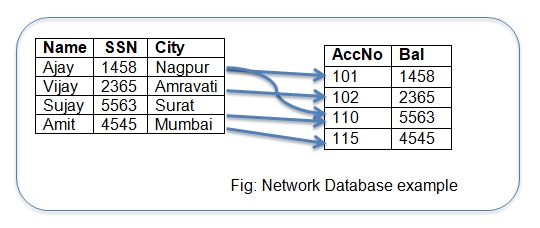

Network database example

B.  Hierarchical Model:


This model is very similar to network model, as in both the models, the data and relationships among data are represented by using records and links respectively. In this model, records are organized as collection of trees rather than arbitrary graphs.


The data storage is in the form of parent child relationship. An origin of the tree is called the root.  Data that follows the root is called a node and the last node in the series is called as a leaf node. Usually, there is one to many relationship found in this model. Following figure shows an example for hierarchical database:


Hierarchical database example


Differences between Relational, Network and Hierarchical Models:

Parameter

Relational model

Network model

Hierarchical model

Relationship

It supports one to many and many to many relationships.

It supports many to many relationships.

It supports one to many relationships.

Nature

It is a table based model, where a table is a collection of rows and columns.

It is based on records and links.

It is based on tree like structure having one root, several nodes and leaf nodes.

Popularity

This model is more popular.

This model is less popular.

This model is less popular.

Applications

It has many applications, almost unlimited.

It is an upgraded version of hierarchical model, so used in the network.

It is mainly used in mainframe and database system.

Data relation

This model uses values to relate data. It does not use pointers or links.

This model uses links to relate data.

This model uses pointers to relate data.

Storage

The data is stored in the form of tables.

The data is stored in the form of arbitrary graph.

The data is stored in the form of a tree having parent - child relationship.


Tuesday, 11 August 2020

What are 7 essential functions of DBMS?


Functions of DBMS:


A primary goal of a DBMS is to provide a way to store and retrieve database information in such a way that it should be both convenient and efficient.


1.    Data Definition:


The data definition tells us that the DBMS must be able to accept data definitions in source form and convert them to appropriate object form. This means, the DBMS must include DDL processor or DDL compiler components for each of the various data definition languages (DDLs).


2.    Data Manipulation:


The DBMS must be able to handle requests to add new data to the database, retrieve, update, or delete existing data in the database. This means, the DBMS must include DML processor DML compiler components for each of the various data manipulation languages (DMLs).


3.    Optimization and Execution:


DML requests, whether planned or unplanned, must be processed by the optimizer component whose purpose is to determine an efficient way of implementing the request. These optimized requests are then executed under the control of runtime manager.


4.    Data Security and Integrity:


A DBMS must have a mechanism to monitor user requests and be able to reject any attempts that violate the security constraints defined by the DBA. These tasks can be carried out at compile time or runtime or sometimes a combination of both.


5.    Data Recovery and Concurrency:


To implement this functionality, a DBMS or some other software component called Transaction Manager or Transaction Processing Monitor must enforce certain recovery and concurrency controls.


6.    Data Dictionary:


A DBMS must provide a data dictionary function.  A data dictionary is a database which contains ‘data about data’ called as metadata or descriptor. Instead of raw data, it contains definition of other objects in the system.

7.    Performance:


DBMS should perform all of the tasks mentioned above as efficiently as possible. Further, the system should process data and generate the results in an efficient way.


Monday, 10 August 2020

Cache coherency and consistency in OS


Caching:


Caching is an important principle of computer systems.  Information is normally kept in main memory. As it is used, it is copied into a faster storage system - the cache on a temporary basis. When we need a particular piece of information, we first check whether it is in the cache.  If it is, we use the information directly from the cache. If it is not, we use the information from the main memory and put a copy in the cache with an assumption that we will need soon in future.


Also the internal programmable registers like index registers provide a high speed cache for a main memory. The programmer or compiler implements the register allocation and register replacement algorithms to decide which information to keep in registers and which to keep in main memory.


Caches can also be implemented totally in hardware. Most systems have an instruction cache to hold the next instructions to be executed.  Without this cache the CPU would have to wait several cycles while an instruction is fetched from main memory thus making the overall processing far slow. For this reason, most systems have one or more high speed data cache in the memory hierarchy.


Cache management is an important design problem as cache memory has limited size.  Careful selection of the cache size and of a replacement policy can result in 80 to 99% of all accesses being in the cache, greatly increasing performance.


The main memory can be viewed as a fast cache for secondary storage since data in secondary storage must be copied into main memory for use and data must be in main memory before being moved to secondary storage for storing it.


The movement of information between levels of storage hierarchy may be either explicit or implicit depending on the hardware design and the OS software being used.  The data transfer from cache to CPU and registers is usually a hardware function. There is no intervention from the OS. Whereas the transfer of data from disk to memory is under the control of an OS.


Cache Coherency and Consistency:


Consider an example, suppose that an integer A is located in file B that is to be incremented by 1, and file be resides on magnetic disk. The increment operation proceeds by first issuing an IO operation to copy the disk block on which A resides to main memory. This operation is followed by copying A to the cache and to an internal register. Thus the copy of A appears in several places:  on the magnetic disk, in main memory, in the cache and in an internal register.


Migration of integer A

Fig:  Migration of integer A from disk to register

Once the increment takes place in the internal register, the value of A differs in the various storage systems. The value of A becomes the same only after the new value of A is written from the internal register back to the magnetic disk.


In a computing environment where only one process execute at a time, this arrangement poses no difficulties, since an access to the integer A will always be to the copy at the highest level of the hierarchy.  However, in a multitasking environment where the CPU is switched back and forth among various processes extreme care must be taken to ensure that if several processes wish to access A, then each of these processes will obtain the most recently updated value of A.


The situation becomes more complicated in a multiprocessor environment where in addition to maintaining internal registers each of the CPU also contains a local cache. In such an environment a copy of A may exist simultaneously in several caches. Since the various CPUs can all execute concurrently we must make sure that an update to the value of A in one cache is immediately reflected in all other caches where A resides.  This situation is called cache coherency and it is usually a hardware problem.


In a distributed environment the situation becomes even more complex.  In such an environment several copies of the same file can be kept on different computers that are distributed in space. Since the various replicas may be accessed and updated concurrently we must ensure that when a replica is updated in one place all other replicas are brought up to date as soon as possible.


Thursday, 6 August 2020

What are instance and schema in DBMS?


Instances and Schema in Database Management Systems (DBMS):

The database changes over time as data or information is inserted, updated and deleted. An instance of the database can be defined as the collection of information stored in the database at a particular moment.

OR

The state of database at any particular moment of time i.e. the collection of data, information along with various object definitions is called the instance of the database.


Whereas, the overall design of the database is called the database schema. In database terminology, the structure is a schema and instance of a schema is a database. We can better describe the concept of schemas and instances by considering an analogy to a program written in a programming language. 


A database schema corresponds to the variable declarations along with associated type definitions in a program. Each variable has a particular value at a given instance of time. These values of the variables in a program at a given time correspond to an instance of a database schema.


Database systems have several schemas that are divided according to the levels of abstraction. The physical schema describes the database design at the physical level while the logical schema describes the database design at the logical level.


A database may also have several schemas at the view level. They are generally called as subschemas that describe different views of the database. The logical schema is the most important in terms of its effect on application programs as programmers construct applications by using the logical schema.


The physical schema is hidden beneath the logical schema and can usually be changed easily without affecting application programs. Application programs are said to exhibit Physical Data Independence if they do not depend on the physical schema and so they need not be rewritten if the physical schema changes.


 A database schema defines its entities and the relationship among them. The database schema is a descriptive detail of the database which can be depicted by means of schema diagrams.


Schema and Instance in database

 Differences between schema and instance:

SN

Schema

Instance

1

The database schema describes the logical view of an entire database.

A database instance is a state of operational database with data at any given time.

2

It tells about how the data is organized and how they are related with each other.

It is a snapshot of database. It tends to change with time.

3

A schema is called as intension.

An instance is called as extension.

4

A database schema does not contain any data or information.

An instance contains information which changes when updates are done.

5

It display only names of record types (entities) and names of data items (attributes) and does not show the relationships among the various files.

An instance will be a set of values of attributes at a given time.

6

The schema will be same but, values in it will change.

An instance of a database changes from time to time.

7

Example:  Student Schema

RN

Name

Address

Class

Phone

Email


Example: Student Instance

RN

Name

Address

Class

Phone

Email

101

Ajay

Arvi Naka, Wardha

XII

123456

ajay@test.com


What are the characteristics of Modern Operating Systems (OS)?

Characteristics of Modern Operating Systems:


The features like huge lines of code or a large number of unnecessary features are not only the good characteristics of operating system. In order to say that a particular OS is modern, we have to consider it’s designing concepts before in order to say that it is a modern operating system.


Modern operating systems have the following important characteristics:


1.    Object Oriented Design:

This is the current and latest trend in designing of operating systems in which the OS creates the object for each facility. Each object is defined using corresponding attributes and has a set of operations.


2.     Multithreading:

An application or a program is divided into a number of smaller tasks. These tasks are executed by the processor concurrently. These smaller tasks are called Threads.  A thread is a lightweight process or a dispatchable unit of work. A thread has some of the characteristics of the process but there are differences -Threads share the same memory space, processes don’t share the memory space.


Multithreading is the ability of a processor by which number of independent threads in an application are executed by the processor at a time. A notable example of multithreading is when we type a document in MS Word. The typed text is formatted, it is spell checked automatically to detect errors and the document can be saved automatically. All these individual tasks are called threads.


3.    Symmetric Multiprocessing:

 A computer having more than one processor is called a multiprocessor. In a multi processor computer, processes can share the memory and IO facilities. Further, these processes share the same job for execution. Such a system is called symmetric multiprocessor system.


An OS designed for symmetric processing is called symmetric multiprocessing operating system. The main function of OS is to schedule the jobs over the multiple processors. Symmetric multiprocessing has the following advantages over uni-processor architecture:


Improved Throughput:  throughput means number of jobs executed by the processor in a given time. As multiple processes can be executed, we get a better throughput.


Improved Reliability: even if one processor fails due to hardware problems, even then the jobs can be executed with the help of other processors. The performance of the system is affected (lowered) but the system withstands the complete failure.


Faster Execution:  from the user point of view, jobs are executed very fast.


4.    Distributed Operating System: 


Distributed operating system is an OS that runs on a network of computers. The OS, memory, files are shared by the number of users in the network from the server. For example 10 nodes are connected by server through LAN.  The OS, data files, RAM, processor slots are shared by 10 users from server. The user thinks that he is running on a single large system with one operating system. The users of a distributed system do not need to know where on the network their files reside.


5.    Microkernel architecture:

It’s a minimal kernel of an OS that performs only the essential functions.  The system processes perform all other OS functions. Note that, here the system processes means servers, and systems that contains the server are called client server model systems.


Tuesday, 4 August 2020

3 Levels of Data Abstraction in DBMS

Three Levels of Data Abstraction:

We know that a database system is a collection of interrelated files and a set of programs that allow users to access and modify these files.

A major purpose of a database system is to provide users with an abstract view of the data. The system hides certain details of how the data are stored and maintained within the database system.

In order to be usable, the system must retrieve data efficiently.  This need for the efficiency has lead designers to use complex data structures to represent data in the database.

Many database system users are not computer trained. As such the developers hide the complexity from users through several levels of abstraction. This is done to simplify users’ interactions with the system.

There are three levels of abstraction provided by the DBMS:


Three Levels of Data Abstraction

Fig: Three Levels of Data Abstraction


1.    Physical level:

  • It is the lowest level of abstraction.
  • It describes how the data are actually stored.
  • The physical level describes complex low level data structures in detail.


2.    Logical level:

  • It is the next higher level of abstraction.
  • It describes what types of data are stored in the database and what relationships exist among those data.
  • The logical level describes the entire database in terms of a small number of relatively simple structures.
  • The user of the logical level does not need to be aware of complexity associated at the physical level structures.
  • DBA have to decide what information to keep in the database uses the logical level of abstraction.


3.    View level:

  • This is the highest level of abstraction.
  • It describes only part of the entire database.
  • Even though the logical level uses simpler structures, the complexity still exists because of the variety of information that is stored in a large database.
  • However, many users of the database system do not need all this information; instead they need to access only a part of the database.
  • As such, this view level of abstraction exists to simplify their interaction with the system.
  • It should be noted that the system may provide many views for the same database as per the user requirements.


What are the Operating System (OS) Structures?

Structure of Operating System:

The structure of operating system consists of four layers. These are hardware, software, system programs and application programs.  The following figure depicts the structure of OS.


Structure of OS


The hardware part consists of CPU, main memory, IO devices, secondary storage etc. The software includes routines for process management, memory management, IO control, file management. The system program layer consists of compilers, assemblers, linker etc. The application programs depend on the users.


Simple Structure:


Simple structure OS consist of small, simple and limited systems. Their structure is not well defined. For ex. MS - DOS is a simple structure OS.


It was initially written to provide the most functionality in the least space. The system started as a small and grew beyond its original scope. Levels were not well separated and as such programs could access IO devices directly. There was no dual user or kernel mode.

 Following figure shows MS-DOS layered structure:


MS-DOS Layered Structure

Layered Approach:


At the bottom layer is the hardware layer having a layer number 0.  The topmost layer (layer N) is the user interface.  An OS could be structured to contain many layers.  Each layer uses the interface provided by the layer below it and provides a more intelligent interface to the layer above it.


Layered structure provides good modularity. Each layer of the OS forms a module with a clearly defined functionality and interface with the rest of the OS. It simplifies debugging, system verification and provides facility of information hiding.


All the data and program are hidden from other module.  Debugging is done at first layer. While debugging, if any error is found, the error must be on that layer because the layers below it are already debugged.  Each layer hides the existence of certain data structures, operations and hardware from higher level layers.


Layered approach required careful definition of the layers because a layer can use only those layers below it. Problem with layered implementations is that they tend to be less efficient than other types.

 The following figure shows a layered kernel:


Layered Kernel